
When Helium Mobile hotspots transfer data, the journey from data report to token reward is more complex than it might initially appear. This post explains how Nova Labs and Helium Oracles process mobile data reports, group them into sessions, burn Data Credits (DC) asynchronously, and determine rewards based on timing.
The Data Processing Timeline
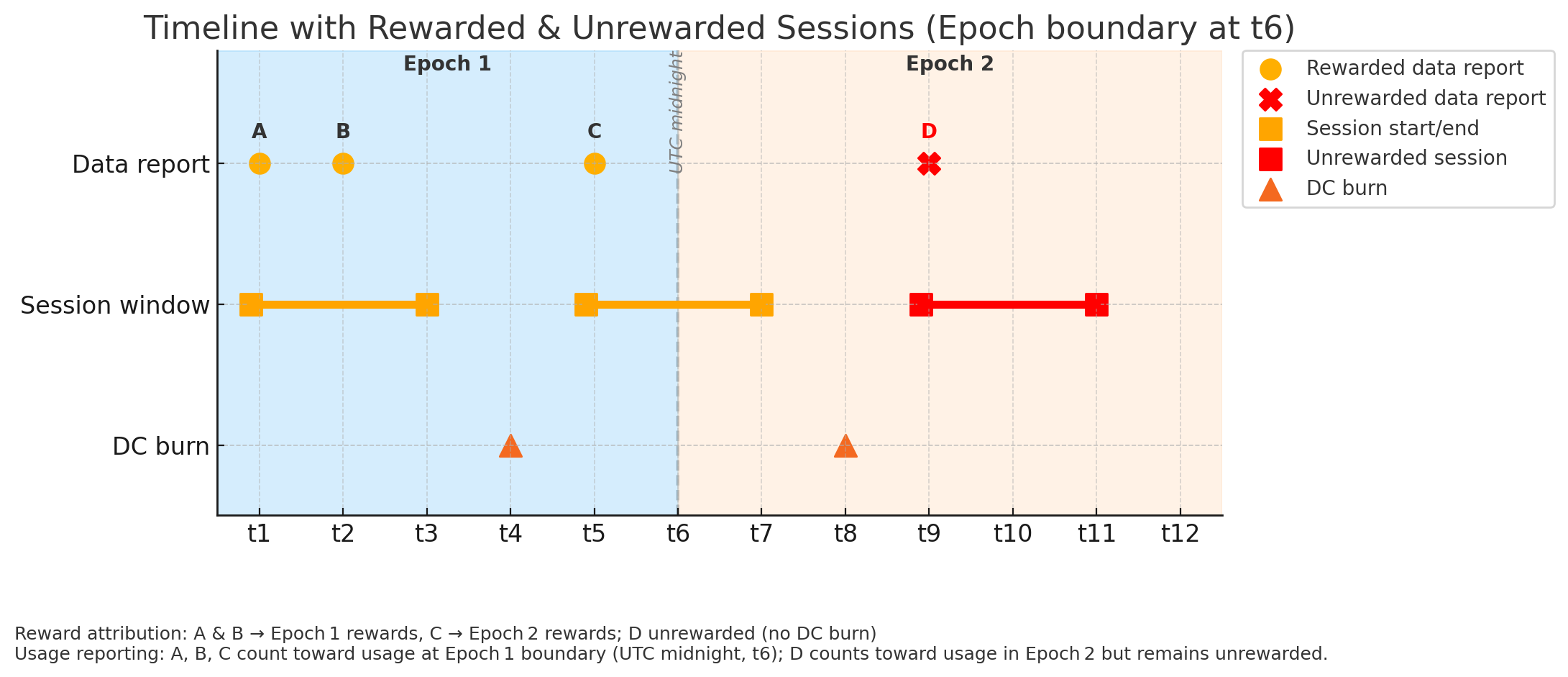
The diagram above illustrates the complete flow of how mobile data reports are processed and rewarded. Let's break down each component:
1. Data Reports (The Starting Point)
Individual data reports (marked as A, B, C, and D in the diagram) are submitted by mobile hotspots as they transfer data. Each report represents a specific data transfer event containing:
- Upload and download bytes.
- Subscriber-related context.
- The timestamp of the actual transfer.
- Gateway details used to attribute the usage.
2. Session Grouping (The Organization Phase)
The Helium Oracles group these individual data reports into sessions. A session represents a continuous period of data transfer activity:
- Sessions start with the first data transfer in that activity window.
- They are terminated periodically by the system.
- Multiple reports from the same period can be bundled together into one session.
In our example:
- Reports A and B are grouped into the first session.
- Report C forms its own session that spans across the epoch boundary.
- Report D is part of a third session.
3. DC Burn (The Critical Payment Step)
After sessions are formed, Data Credits must be burned to pay for the data transfer. This is where timing becomes crucial:
- DC burns happen asynchronously, not immediately when the data is transferred.
- A scheduled task closes sessions and triggers the burn process.
- The burn process itself takes time to complete.
- This delay between session end and DC burn is normal and expected.
4. Epoch Boundaries and Reward Attribution
Helium Mobile rewards are calculated at epoch boundaries, typically around UTC midnight. The key idea is this: rewards are attributed to the epoch when the DC burn occurs, not when the data was originally transferred.
In our example:
- Reports A & B: Data transferred in Epoch 1, DC burned at t4 in Epoch 1 → rewarded in Epoch 1.
- Report C: Data transferred starting in Epoch 1, but DC burned at t8 in Epoch 2 → all rewards go to Epoch 2.
- Report D: Data transferred in Epoch 2, but no DC burn occurred yet → not rewarded yet.
What Happens When Hotspot Data Reporting Lags
There is another wrinkle beyond the normal asynchronous reward timing: sometimes the hotspot can keep carrying traffic normally while temporarily failing to report that usage to the Oracles. Once the hotspot recovers, those hotspot data reports may reach the Oracles later.
In that case, the usage still belongs to its original report day, but the related rewards may settle in the epoch of the later arrival day. This is why a hotspot can appear to have carried data on one day while the related settlement shows up later.
This also explains why usage views can disagree across platforms. Helium World Explorer usage expects hotspot data reports to reach the Oracles within their original epoch. Reports that reach the Oracles in a later epoch may not be displayed on the World Explorer for their original day.
Why This Matters
Understanding both the normal processing flow and lagged-report cases helps explain several common scenarios:
- Delayed Rewards: Data transferred late in an epoch might not be rewarded until the next epoch if the reward process completes after the boundary.
- Reward Timing Mismatches: The rewards you see for a specific epoch might include data transferred earlier and exclude some newer traffic that has not settled yet.
- Lagged Hotspot Reports: A hotspot may still be carrying traffic while usage tools for that original day show less activity than expected because the reports reached the Oracles later.
How HeliumGeek Surfaces This
Fleet Management Platform
In the HeliumGeek Fleet Management platform, this distinction is presented as two views: Live Data for the operational usage side and Settled Data for the payment-facing side.
HeliumGeek currently tolerates lagged hotspot data reporting for about 16 hours in hourly views and about 72 hours in day, month, and broader views.
API
The HeliumGeek API exposes the same idea through multiple endpoints:
/gateways/{address}/mobile/data/sum for summarized usage,
/gateways/{address}/mobile/data/sum?source=raw for a slower unsummarized usage check,
and /gateways/{address}/mobile/rewards/sum plus
/gateways/{address}/mobile/rewards for the settled reward side.
Mobile App
The HeliumGeek mobile app does not label separate tabs as Live Data and Settled Data, but the same distinction is still there: the hourly and daily data trend charts are the operational usage side, while the reward details show the settled side and the amounts that actually landed.
Best Practices for Hotspot Operators
- Watch the usage side for operations: use usage views to confirm the hotspot is actively carrying traffic.
- Use settled views for payment questions: use rewards or settled data when reconciling what was actually paid.
- Remember epoch timing: reward attribution depends on when settlement finishes, not only when traffic was first carried.
- Keep lagged reporting in mind: if a hotspot has reporting issues, usage for the original day may surface later once those reports reach the Oracles.
Conclusion
The Helium Mobile reward flow is not only about carrying traffic. It also depends on when hotspot data reports reach the Oracles and when the related rewards settle. By understanding the flow from reports to rewards, plus the possibility of lagged hotspot data reporting, hotspot operators can better interpret both usage and earnings.
HeliumGeek reflects that reality across its fleet platform, API, and mobile app by giving you ways to inspect both the operational usage side and the settled reward side of the same underlying activity.